Search Scan Log
Use this page to find and review barcode scan activity in Tarot.
Scan logs show when and where units were scanned (for example, during loading or delivery). This helps you track activity and investigate issues.
This page is especially useful for pre-scanned parcels that may not have been assigned to a run, because scan activity for those parcels is only recorded here in Tarot.
Open Search Scan Log
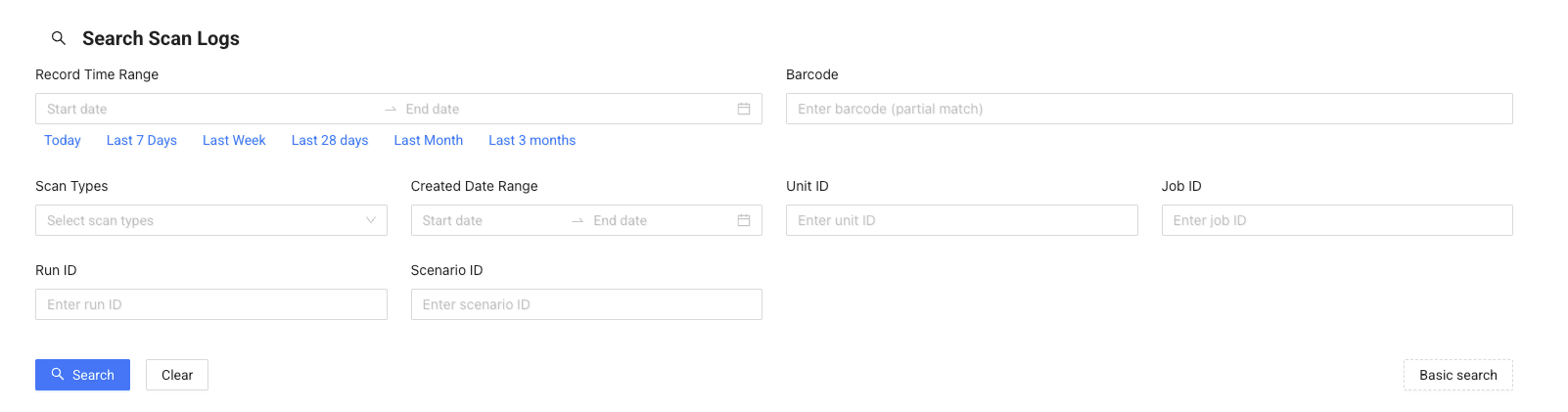
Use filters to narrow down the results, then click Search.
Filter Scan Log
You can filter scan logs depending on what you need to find:
- Record Time Range – find scans within a specific time period
- Barcode – search for a specific unit using its barcode
- Scan Types – filter by scan events (e.g. load, unload)
- Unit ID / Job ID / Run ID – find scans linked to specific entities
- Scenario ID – filter by scenario
Use filters to quickly locate missing scans or investigate what happened to a unit.
Note
A date range is required when searching. If you are unsure of the exact dates, use a wider date range or perform multiple searches with smaller ranges.
View Results
After searching, you will see a list of scan records.
Each row shows:
- Barcode
- Scan type
- Record time
- Unit, job, and scenario
- Organisation
This helps you understand when and where each scan happened.
Scan Log Details
Click Details to open the scan log.
Here you can:
- See full scan information
- View related unit, job, and run
- Check the location on the map
Use this view when you need to investigate a specific scan event.